No products in the cart.
Powerful Turbo Addons WooCommerce Widgets for Stunning Online Stores
Enhance your shop pages with modern, fast, and fully customizable WooCommerce widgets — built for higher conversions.
0
0.00$
0
Items Seleceted
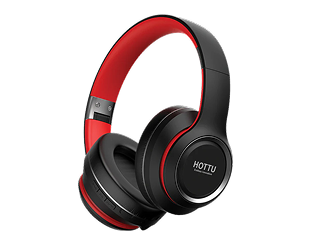
Apple HOTTU BH03 Bluetooth Headphone
102.00$
Category: Telecom
Status
Tired of tangled wires and earbuds that slip out mid-commute? The Apple HOTTU BH03 Bluetooth Headphone gives you stable wireless audio, a comfortable over-ear fit, and controls right on the earcup. Pair it once and it reconnects automatically when you power it on. Use it for music, podcasts, calls, and video meetings without cable clutter. The cushioned headband and soft ear pads stay comfortable through long listening sessions, while the rechargeable battery keeps up with your day. If you want simple, reliable wireless sound without paying flagship prices, the HOTTU BH03 is a practical everyday pick.
About the Product
Description
Apple HOTTU BH03 Bluetooth Headphone
The Apple HOTTU BH03 Bluetooth Headphone is a wireless over-ear headset built for everyday listening. It connects to your phone, tablet, or laptop over Bluetooth, so you can move around without a cable pulling at your pocket. Pairing takes seconds, and the headphone remembers your device for the next time you switch it on.
Why Choose the HOTTU BH03
Most budget headphones force a trade-off: poor comfort or weak battery. The BH03 aims for balance instead. The padded headband spreads weight across your head, and the soft ear cushions reduce pressure during long sessions. On-ear controls let you adjust volume, skip tracks, and take calls without reaching for your phone.
Key Features
- Wireless Bluetooth audio — stream music, podcasts, and calls from compatible devices.
- Over-ear comfort — cushioned pads and an adjustable headband for extended wear.
- Built-in microphone — take hands-free calls and join online meetings.
- Rechargeable battery — charge via USB and listen through the day.
- On-earcup controls — manage playback and volume without your phone.
- Foldable design — easier to store in a bag or backpack.
Everyday Uses
Use the HOTTU BH03 during your commute, at your desk, or while studying. It works well for video calls, casual gaming, and watching shows on a laptop. Because it is wireless, you can leave your phone charging across the room and keep listening.
What You Should Know
Bluetooth range and battery life vary with your device and volume level. For the most stable connection, keep the headphone within a normal indoor range and avoid thick walls between it and your phone. Clean the ear pads with a dry cloth to keep them fresh.
Pairing Tips
Turn the headphone on and hold the power button until the indicator flashes. Open your device’s Bluetooth settings, select the HOTTU BH03, and confirm. If it does not appear, turn the headphone off and on again, then repeat the steps.
Looking for a wired alternative or a different model? Browse our full headphone collection to compare options.
Related Product