10 Elementor Hacks to Improve User Engagement
With over 5 million active installations, Elementor has become a cornerstone for WordPress users looking to design custom websites with ease. However, not all Elementor users are tapping into the tool’s full potential. According to a recent analysis by SEMrush, websites optimized for user engagement often see a 20% increase in user retention. This underscores the importance of fully utilizing plugins like Elementor to craft engaging user experiences. This blog will explore ten specific Elementor hacks that enhance user engagement and improve overall site performance through better SEO practices.
In the following sections, readers will gain insights into how to leverage Elementor’s features to create compelling landing pages, improve speed, and drive conversions. Packed with practical tips and examples, this guide is your roadmap to optimizing your WordPress site with Elementor.
What Is Elementor?
Elementor is a leading page builder plugin for WordPress. It is designed to enable users—ranging from novices to experts—to create attractive, feature-rich web pages with minimal effort. It provides a drag-and-drop interface that facilitates real-time, front-end customization of web pages, eliminating the need for coding knowledge. This ease of use makes it an ideal tool for a variety of users, including web developers, designers, and digital marketers aiming to craft professional websites.
The popularity of Elementor can be attributed to its extensive toolkit. That toolkit includes over 85 widgets, a library of pre-designed templates, and an intuitive header/footer builder. This versatility allows users to create anything from simple landing pages to complex e-commerce sites, making it an essential component of the modern web design arsenal.
10 Elementor Hacks for Enhanced User Engagement
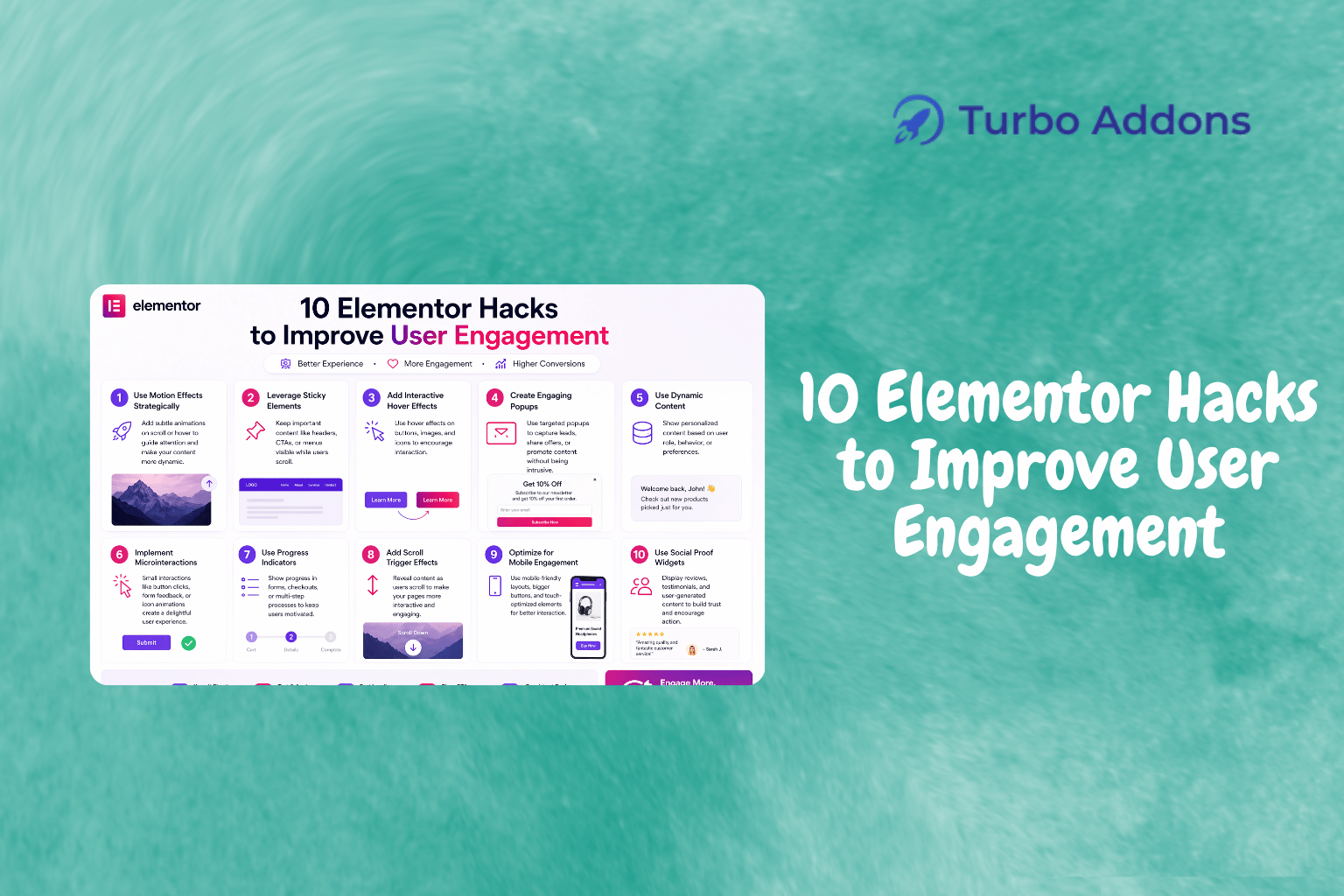
When discussing user engagement, it’s crucial to consider both aesthetic appeal and functional design. Here, we’ll delve into ten specific Elementor hacks that can significantly improve how users interact with your Elementor-powered website. Firstly, take advantage of content widgets like the Advanced Heading or Icon Button to draw attention to key content areas. The strategic placement and styling of these widgets highlight important information, making the user journey more intuitive and engaging.
Another hack involves optimizing speed and performance. Speed is a critical component, and using lightweight design elements can enhance load times. Tools such as the Turbo Addons for Elementor offer widgets optimized for performance, ensuring swift page transitions and decreasing bounce rates. By integrating these, you deliver a seamless experience that adheres to Google’s Core Web Vitals—boosting both engagement and SEO.
Furthermore, using dynamic content widgets can personalize the experience without manual intervention. For instance, widgets like the Active Visitor Viewer in Turbo Addons track and display real-time visitor data, allowing for tailored content suggestions. Personalization engenders a sense of connection with users, often translating into increased engagement and conversions.
Integrating social connect options through widgets like the Social Bar ensures that users can easily share content, driving both user engagement and brand reach. Coupled with reviews and testimonial sliders, this creates a cycle of user-generated content that bolsters credibility and prompts further user interaction.
Lastly, for e-commerce platforms, WooCommerce-specific widgets available in Turbo Addons support the creation of bespoke product pages that both inform and entice. Leveraging tools like the WOO Product Rating or WOO Product Tabs not only improves user interaction but also assists in driving sales by ensuring customers have all necessary details to make informed purchasing decisions. For more details on utilizing these widgets, visit our Turbo Addons page.
Types of Widgets
Elementor, complemented by the right addons, offers diverse widget types to meet various site needs. Content widgets such as the Advanced Accordion or News Ticker enhance textual presentations by making content more interactive. These widgets allow information to be segmented into easily navigable sections, which can significantly improve user experience and engagement.
For those looking to create visually stunning pages, visual widgets like the Hero Slider or Image Carousel are invaluable. These widgets allow for creative displays of images and media that captivate visitors right from their first landing. They aren’t just about aesthetics; these elements can guide users through a narrative or call-to-action path effectively.
Dynamic content widgets like the Post Filter Tab provide functionality that adapts to users’ needs, thus improving usability. Social widgets, such as the Review Archive, help integrate social proof directly into your site, which can enhance trust and encourage user interaction. Combined, these widget types allow developers to build comprehensive, engaging websites.
Pricing
Turbo Addons for Elementor offers both free and premium pricing plans to cater to different user needs. The free version provides unlimited site access with essential widgets suitable for basic users. However, for those seeking more advanced features, premium plans are available both as annual subscriptions and lifetime licenses.
Annual plans start at $24.99 for personal use, while business plans support up to 10 sites at $49.99 per year. The agency plan, allowing for 1,000 sites, is priced at $119.99 annually. Lifetime plans do not require renewals and start at $159.99, scaling up to $399.99 for the agency package. Regardless of the plan chosen, users get access to ongoing support and updates.
Why It Matters
Effective use of Elementor and its addons directly contributes to a site’s engagement and conversion rates. By optimizing for speed and incorporating dynamic, user-focused designs, you ensure a smooth visitor experience. This experience is critical as it directly influences a site’s bounce rate and average session duration, both key metrics in SEO.
Engagement tools like those offered by Turbo Addons provide an edge by incorporating visual and interactive elements that maintain user attention. These tools not only keep visitors on your site longer but also encourage them to explore more deeply, increasing the likelihood of conversion actions such as filling forms or completing purchases.
Moreover, enhanced engagement directly benefits your site’s search engine ranking. By improving engagement metrics, such as reduced bounce rates and increased dwell time, you signal to search engines that your site is valuable and relevant, which can lead to improved organic search rankings over time.
How It Works
To utilize these Elementor hacks, begin by assessing your current site’s design and functionality. Identify areas where user engagement might be lacking and determine which widgets or features could enhance these aspects. Turbo Addons simplifies this process by providing a comprehensive suite of widgets designed to enhance both aesthetic and functional aspects of your site.
For instance, incorporating an Advanced Accordion can organize complex information, making it more digestible and engaging for users. Similarly, using the Social Bar widget can facilitate user interaction, driving shares and enhancing your site’s visibility across different platforms.
Installation and setup are straightforward. After downloading Turbo Addons, you can easily access its vast library of features directly from your WordPress dashboard. Simply navigate to the Elementor add widgets section and drag your desired elements onto your page. Adjustments and customizations can be made in real-time, providing a seamless design experience.
CTA
If you’re ready to enhance your website’s user engagement and performance, take the next step by exploring Turbo Addons for Elementor. Visit Turbo-Addons.com to get started today.
FAQs
What happens after I purchase a plan?
Upon purchasing a plan, you will receive an email containing a license key and download link. This allows easy activation right within your WordPress dashboard under Turbo Addons settings. The process is straightforward, and comprehensive support is available to assist with any installation or activation queries. This efficient setup ensures you’re ready to use advanced features without delay.
Can I use my license on multiple websites?
Each Turbo Addons plan provides a defined website usage limit. The Personal Plan covers 2 websites, the Business Plan supports 10, and the Agency Plan accommodates up to 1,000 sites. To activate your license on a WordPress site, navigate to the Turbo Addons settings under the WordPress Dashboard and enter your provided license key, ensuring all sites are equipped with Turbo Addons capabilities.
Do I need Elementor Pro to use Turbo Addons?
No, Turbo Addons is compatible with both the free and Pro versions of Elementor. While some features may perform optimally with Elementor Pro, all Turbo Addons functions are accessible without it. This flexibility ensures that all users, regardless of their Elementor edition, can benefit from the rich feature set offered by Turbo Addons.
What is included in Support & Updates?
Support and updates include access to regular plugin updates, which bring new features and enhancements to your Turbo Addons experience. You’ll also receive assistance for plugin-related queries and troubleshooting from the support team. This ongoing support is available for active subscriptions, ensuring that you’re never left without help when you need it most.
Featured image: https://turbo-addons.com/wp-content/uploads/2026/04/Turbo-Addons-15.png